
renderlapse: Create timelapse video from Minecraft world backups
This program creates a timelapse video from your Minecraft world backups. It uses Chunky to generate screenshots of each of the worlds, and ffmpeg to concatenate screenshots into a video.
Preparing World Backups
You should prepare backups in the same directory for a batch rendering. Each backup should be a full Minecraft world which can be played in Minecraft without any modification. If your world is separated into multiple dimensions (e.g. world, world_nether, world_the_end), you can take just one dimension you'd like to render.
Every backup should be contained within a folder named world-yymmdd!
The structure of the directory should be like this:
..
└ world-170101
  └ world
    └ level.dat
    └ ...
└ world-170205
└ world-170316
└ world-170409
└ world-170520
└ ...Preparing JSON file (requires Chunky)
Create a preset JSON scene file so that Chunky can reuse it to render multiple worlds with the same camera angle and settings.
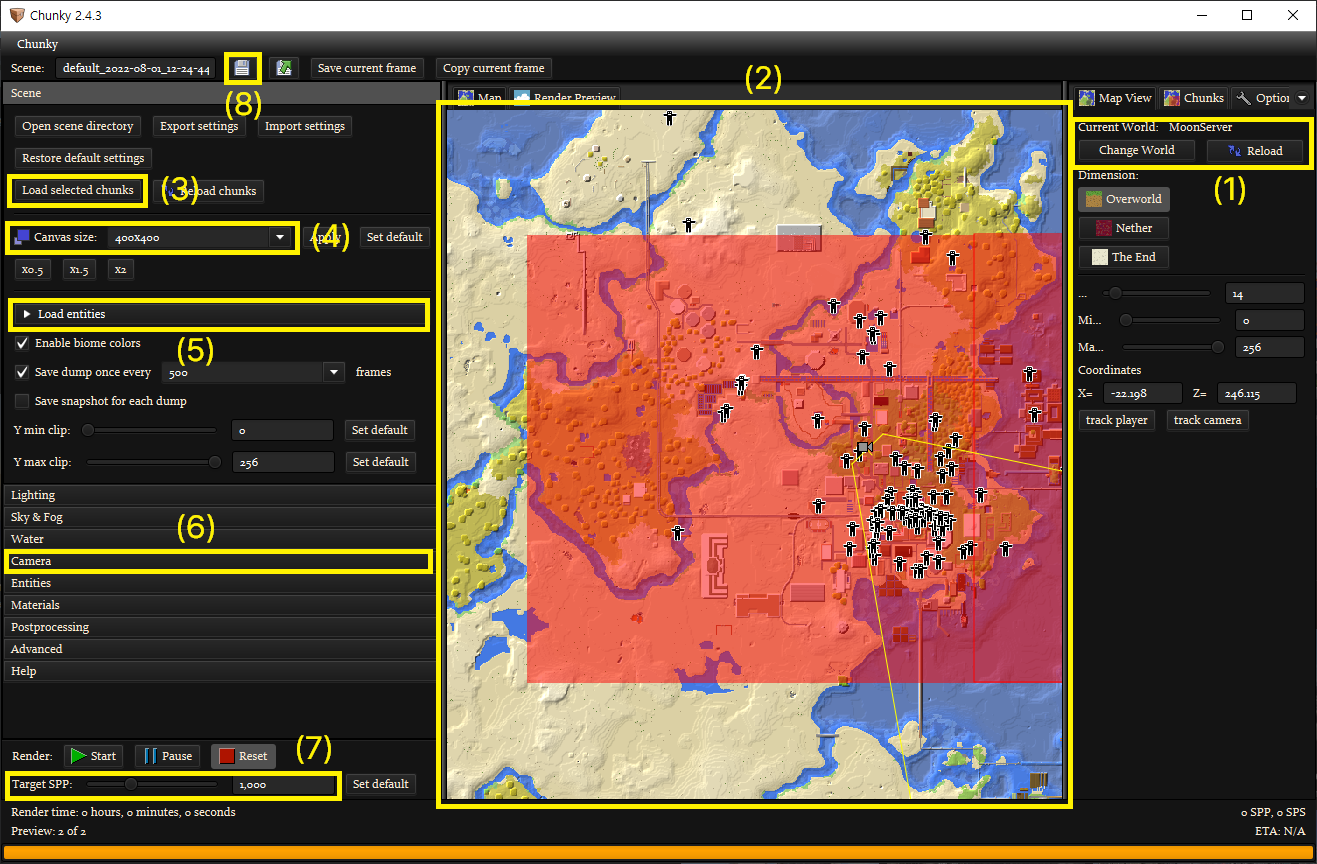
1) Load one of your backup worlds.
2) Select chunks to render. Be careful - Chunky throws an error when it tries to render chunks that are not generated. You need another scene with the same settings but smaller chunk range for older worlds that don't have enough chunks to render.
3) Load selected chunks.
4) Canvas size. 1920 * 1080 is recommended.
5) Un-check all entities.
6) Set the camera. You can do this in Render Preview tab as well.
7) Set target SPP(Samples Per Pixel). 64 is recommended.
8) Save the scene.
Rendering (requires Chunky & ffmpeg)
Rendering frames: render, ren
python renderlapse.py --chunky-root CHUNKY_ROOT [--chunky-jar CHUNKY_JAR] [--scene-dir SCENE_DIR] --scene-name SCENE_NAME render --backup-dir BACKUP_DIR --world WORLD [--jre-path JRE_PATH] [--jre-mem JRE_MEM] [--jre-arg JRE_ARG] [--chunky-arg CHUNKY_ARG].
Brackets around a parameter indicate that it is optional. For help, type python renderlapse.py render -h.
Generating video: genvideo, vid
python renderlapse.py --chunky-root CHUNKY_ROOT [--chunky-jar CHUNKY_JAR] [--scene-dir SCENE_DIR] --scene-name SCENE_NAME genvideo [--ffmpeg-path FFMPEG_PATH] [--ffmpeg-arg FFMPEG_ARG] [--framerate FRAMERATE] [--vid-path VID_PATH] [--frame-duration FRAME_DURATION] [--sync].
Brackets around a parameter indicate that it is optional. For help, type python renderlapse.py genvideo -h.
Troubleshooting
Chunky throws java.lang.NullPointerException: Cannot invoke "String.equals(Object)" because the return value of "se.llbit.chunky.world.Chunk. getVersion()" is null
This error occurs when Chunky attempts to render chunks that have not yet been generated. See (2) at Preparing JSON file.